


 FREE GIFTS WITH ALL ORDERS
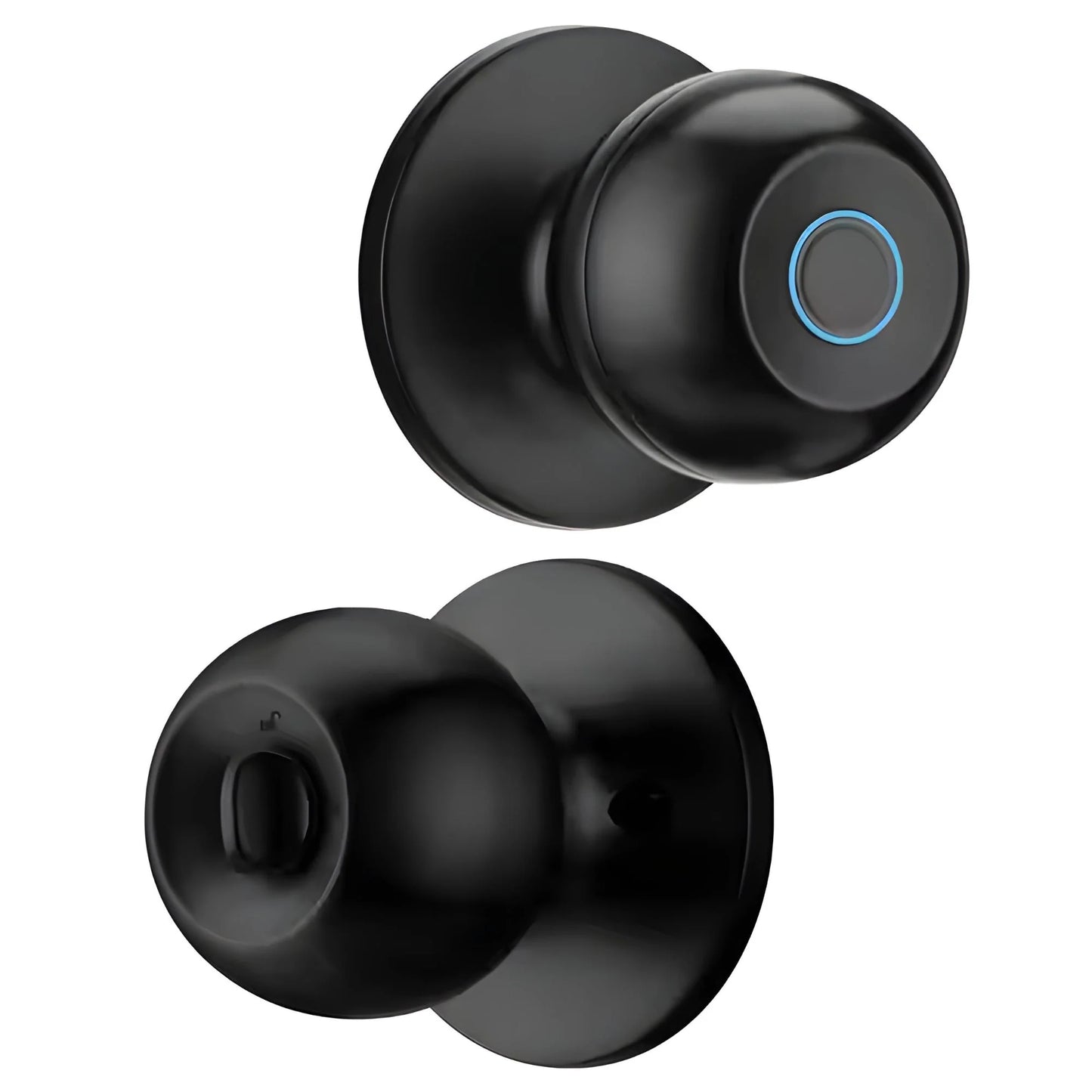
TouchTurn™ by CalmCavern - Easy Turn & Quick Install Secure Fingerprint Lock
TouchTurn™ by CalmCavern - Easy Turn & Quick Install Secure Fingerprint Lock
Secure
Effortless
Instant
Whats Included?
Whats Included?
- 1 × SwiftSteam 2-in-1 Garment Steamer
- 1 × Detachable Water Tank (250 mL)
- 1 × Fabric Brush Attachment
- 1 × Measuring Cup
- 1 × Heat-Resistant Glove
- 1 × User Manual
Couldn't load pickup availability
Fast Fingerprint Entry with TouchTurn™ Ease
Smart Door Security Installed in Minutes
Turn-and-Go Access with Advanced Protection
How long does the fingerprint setup take?
How long does the fingerprint setup take?
Setup takes less than a minute—just scan your fingerprint, save it, and the lock is ready to use.
Does the lock require professional installation?
Does the lock require professional installation?
No. TouchTurn™ is designed for quick DIY installation with no wiring or drilling required.
How long does the battery last?
How long does the battery last?
The lock’s battery typically lasts 6–12 months depending on usage, and you’ll receive a low-battery alert when it's time to replace.


How to Use Your Calmcavern™ Essentials
We Stand By Our Products.
Reliable, durable, and built to last—our products are backed by a promise of quality and your complete satisfaction.

Product Description
Product Description
A sleek, secure biometric smart lock featuring fingerprint access for fast and keyless entry. Includes a touch-sensitive keypad for PIN entry and a traditional mechanical override key. Powered by AA batteries with low-battery alert and emergency power via USB. Easy to install on most standard doors, with a reversible handle design. Supports multiple user profiles, voice prompt guidance, and anti-tamper alarm for added safety.
Product Guide
Product Guide
. Unboxing & Contents
- TouchTurn™ Fingerprint Lock
- Mounting Hardware & Screws
- User Manual
- Backup Keys (2 pcs)
2. Installation Steps
- Remove your existing lock (if applicable).
- Position TouchTurn™ on the door and align holes.
- Secure with included screws.
- Attach interior panel and tighten.
- Insert batteries and check alignment.
3. Fingerprint Registration
- Press the registration button.
- Scan your finger 2–3 times until confirmed.
- Repeat for additional users (up to 50 fingerprints).
4. Using the Lock
- Unlock: Place registered finger on the sensor.
- Lock: Turn the knob or press lock button.
- Manual Key: Use backup key if battery runs out.
5. Battery & Maintenance
- Uses 4 AA batteries (included).
- Battery lasts 6–12 months depending on usage.
- Clean sensor with a soft, dry cloth.
6. Safety & Tips
- Avoid placing fingerprints when hands are wet or dirty.
- Keep backup keys in a safe place.
- Regularly check battery levels to prevent lockout.
7. Support
For troubleshooting or assistance, contact CalmCavern Customer Support via email or phone.
Specifications
Specifications
🔧 Specifications
- Unlock Methods: Fingerprint, PIN code, Mechanical key
- Fingerprint Capacity: ~ 100–200 users
- PIN Code Capacity: ~ 50–150 codes
- Door Thickness Supported: ~ 35–70 mm
- Power Supply: 4 × AA Alkaline batteries
- Emergency Power: External power via USB (or 9 V battery backup)
- Low Battery Indicator: Yes (LED / sound)
- Operating Temperature: ~0°C to +45°C
- Backup Unlock: Mechanical key + emergency power
Additional Security: Anti-tamper alarm, auto-lock mode
HOW DOES TouchTurn™ WORK?

TouchTurn™ – Effortless Fingerprint Security
Experience quick, key-free access with a lock designed for fast installation, smooth turning, and reliable fingerprint recognition—perfect for any door.
Step-by-Step Guide
Before & After Transformation
See the difference TouchTurn™ makes—upgrading your door from outdated locks to sleek, secure, fingerprint-powered convenience.

Compare & Choose
Discover why TouchTurn™ outperforms traditional locks—see the clear advantages in security, convenience, and modern features.
| Calm Cavern | Others | |
|---|---|---|
| Fingerprint + Key | ||
| Easy & Quick | ||
| Unlock in seconds | ||
| Long-lasting electronic components | ||
| Multiple fingerprints, auto-lock, alarm |
★★★★★ 5,000+ Happy Customers This Iron is Hot
QUESTION
How to get best results?
How to get best results?
Follow these simple tips to ensure maximum accuracy, speed, and long-term performance.
- Register Multiple Fingers — Add 2–3 fingerprints per user for faster recognition.
- Scan from Different Angles — Capture edges and tips during setup to improve accuracy.
- Keep Sensor Clean — Wipe the fingerprint pad occasionally to maintain quick response.
- Check Battery Level — Replace or recharge early to prevent slow unlocks.
- Align Door Properly — Ensure the strike plate lines up for smooth locking and unlocking.
- Update Access Regularly — Remove old users and add new ones as needed for security.
Shipping & Delivery
Shipping & Delivery
- Shipping is available to all regions in Bangladesh, including Dhaka and outside.
- Delivery within Dhaka generally takes 1–3 business days.
- Deliveries outside Dhaka may take 3–7 business days, depending on location.
- International orders typically arrive in 15–30 days, subject to customs and courier processing.
- Tracking information will be provided once your order is dispatched, so you can monitor its progress.
- Any applicable import duties, taxes, or customs fees are the responsibility of the recipient.
- Please double-check your delivery address to avoid delays or returns.